
Signing documents is part of everyday workforce operations.
Employment contracts, onboarding forms, compliance documents, Delivery Notes and project approvals all require signatures before work can continue.
While digital signatures eliminate paper-based processes, users still waste valuable time repeatedly drawing the same signature or signing documents one by one.
With Saved Signatures and Bulk Signing, SquidWeb transforms digital signing into a fast, reusable workflow that helps organizations approve documents in seconds.
The hidden inefficiency of digital signatures
Many organizations have already replaced paper with digital documents.
However, repetitive signing remains an overlooked source of administrative work.
Users often need to:
- Draw the same signature repeatedly
- Upload the same signature image multiple times
- Open and sign documents individually
- Repeat identical approval actions across different workflows
Each action only takes a few seconds—but across hundreds or thousands of documents, those seconds quickly become hours of unnecessary work.
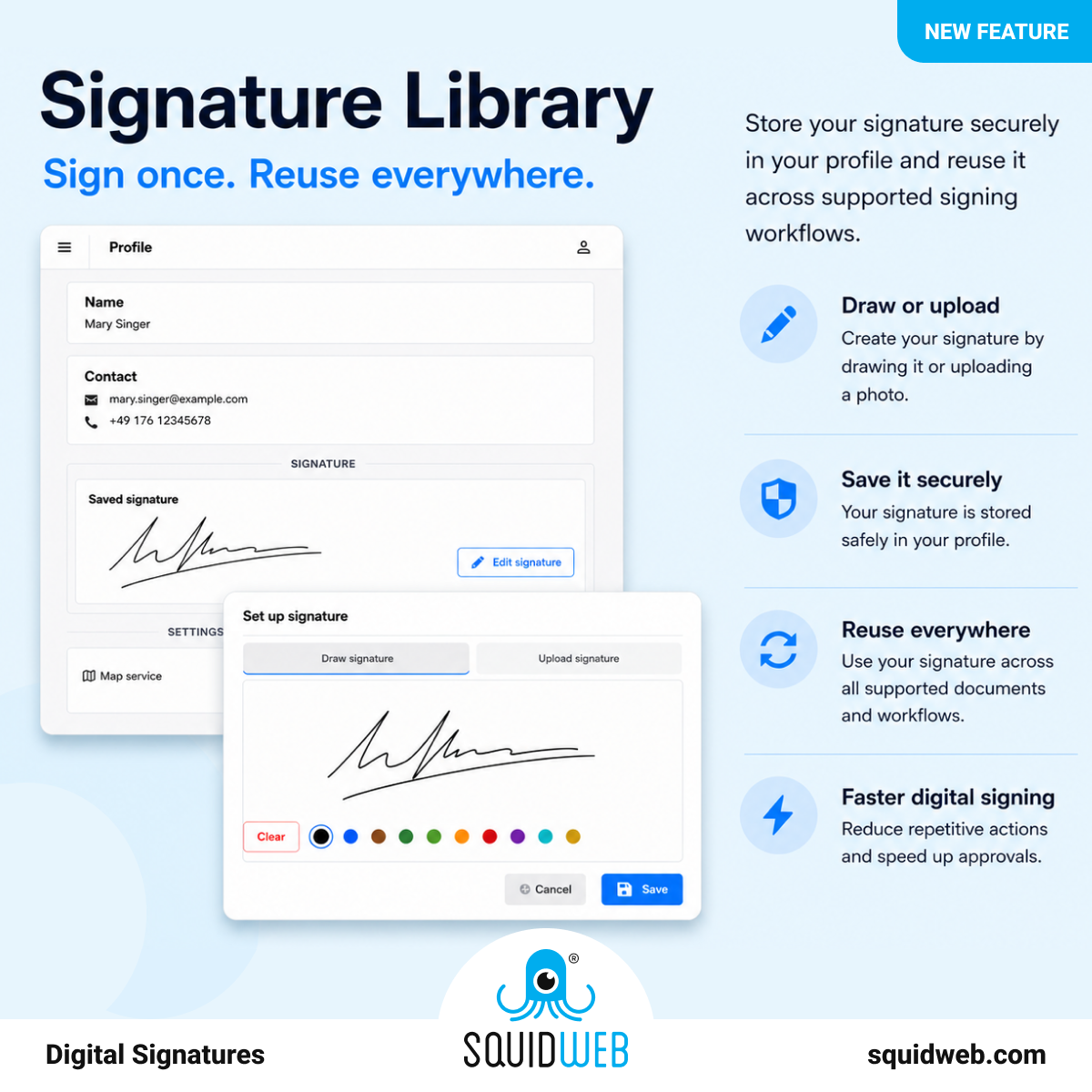
Save your signature once
Every SquidWeb user can securely store a personal signature directly in their profile.
Creating a signature takes only a few moments.
Users can either:
Draw a signature
Use SquidWeb’s built-in signature pad to draw a handwritten signature directly within the platform.
or
Upload an existing signature
Already have a digital version of your signature?
Simply upload it and save it to your profile.
Once saved, the same signature is automatically available whenever a supported signing workflow requires approval.
No more recreating signatures. No more uploading the same file.
Simply review, approve and continue.
Bulk Signing
Saving a signature removes repetitive drawing.
Bulk Signing removes repetitive clicking.
Instead of opening and signing documents individually, users can approve multiple documents in a single action.
Whether reviewing onboarding paperwork, processing operational documentation or approving multiple Delivery Notes, Bulk Signing dramatically reduces administrative effort.
One feature. Multiple use cases.
Saved Signatures and Bulk Signing simplify document approvals across the entire workforce.
Planners
Approve operational documents and internal workflows faster without repeatedly signing every document.
Crew Members
Quickly sign employment contracts, onboarding documents and other required paperwork.
Clients
After completing a project, clients can save their signature once in the SquidWeb Client App and reuse it for future Delivery Notes and operational approvals.
Instead of drawing a signature after every event, approvals become almost instantaneous.
Supervisors
Review and approve project documentation without interrupting daily operations.
A better experience for your clients
Many staffing companies require client approval after every project.
Without a reusable signature, every Delivery Note requires clients to repeat exactly the same action.
With the SquidWeb Client App, clients simply save their signature once and reuse it whenever they approve future work.
The result is:
- Faster client approvals
- Less administrative work
- A smoother customer experience
- Faster completion of operational documents
Both your team and your clients benefit from the same streamlined approval process.
Fully integrated into SquidWeb
Saved Signatures and Bulk Signing work seamlessly across supported SquidWeb signing workflows.
There are no additional applications to install and no external signing tools to manage.
Everything happens inside the same workforce management platform.Everything happens inside the same workforce management platform.
Why it matters
Every digital workflow contains small repetitive actions. Individually they seem insignificant. Across thousands of documents, they become hours of unnecessary administrative work.
Saved Signatures and Bulk Signing remove that friction by making document approvals faster, more consistent and easier for everyone involved.
Organizations can:
- Save signatures once and reuse them across supported workflows
- Draw or upload a preferred signature
- Sign multiple documents simultaneously
- Speed up client and employee approvals
- Reduce repetitive administrative work
- Improve the overall document approval experience
From digital signatures to digital efficiency
Digital signatures should do more than replace paper. They should eliminate repetitive work.
By combining reusable signatures with Bulk Signing, SquidWeb helps organizations simplify approvals, reduce administration and create faster digital workflows for planners, crew members, supervisors and clients alike.
Want to see Saved Signatures and Bulk Signing in action?
Request a demo and discover how SquidWeb helps organizations approve documents faster by allowing users to save their signature once and sign multiple documents in seconds.